InterPlanetary File System (IPFS) Guide: Building Immutable Web
— by
Steven Haynes
Outline:
1. Introduction: Define IPFS and the shift from location-based to content-based addressing.
2. Key Concepts: Content Addressing (CIDs), The Merkle DAG, and Decentralized Peer-to-Peer networks.
3. Step-by-Step Guide: Setting up an IPFS node and pinning data.
4. Real-World Applications: Archiving, decentralized hosting, and NFT metadata storage.
5. Common Mistakes: Misunderstanding persistence, lack of pinning, and security privacy.
6. Advanced Tips: IPNS for dynamic content and integrating with Filecoin.
7. Conclusion: The future of the permanent web.
***
The InterPlanetary File System (IPFS): Building the Immutable Web
Introduction
The current internet relies on location-based addressing. When you type a URL into your browser, you are asking a specific server, “What is at this location?” This model is fragile. If the server goes down, the file moves, or the domain expires, your data vanishes—a phenomenon known as “link rot.”
The InterPlanetary File System (IPFS) fundamentally changes this paradigm. Instead of asking where a file is located, IPFS asks what the file is. By using cryptographic hashes to identify data, IPFS creates a web that is permanent, decentralized, and resistant to censorship. For professionals, developers, and data architects, understanding IPFS is the first step toward building applications that don’t rely on central points of failure.
Key Concepts
To leverage IPFS effectively, you must understand three core pillars: Content Addressing, the Merkle DAG, and the P2P Network.
Content Addressing (CIDs)
In IPFS, every file is assigned a unique Content Identifier (CID). This is a cryptographic hash of the data itself. If you change a single bit of a file, the CID changes entirely. Because the hash is derived from the data, two people hosting the same file will generate the same CID, allowing IPFS to deduplicate data across the entire network.
The Merkle DAG
IPFS organizes data using a Directed Acyclic Graph (DAG). This structure links files and directories together using their CIDs. Because these links are cryptographic, the entire file system is tamper-evident. If you download a large folder, IPFS can verify the integrity of every individual file against the root hash, ensuring that you received exactly what you requested.
Peer-to-Peer (P2P) Networking
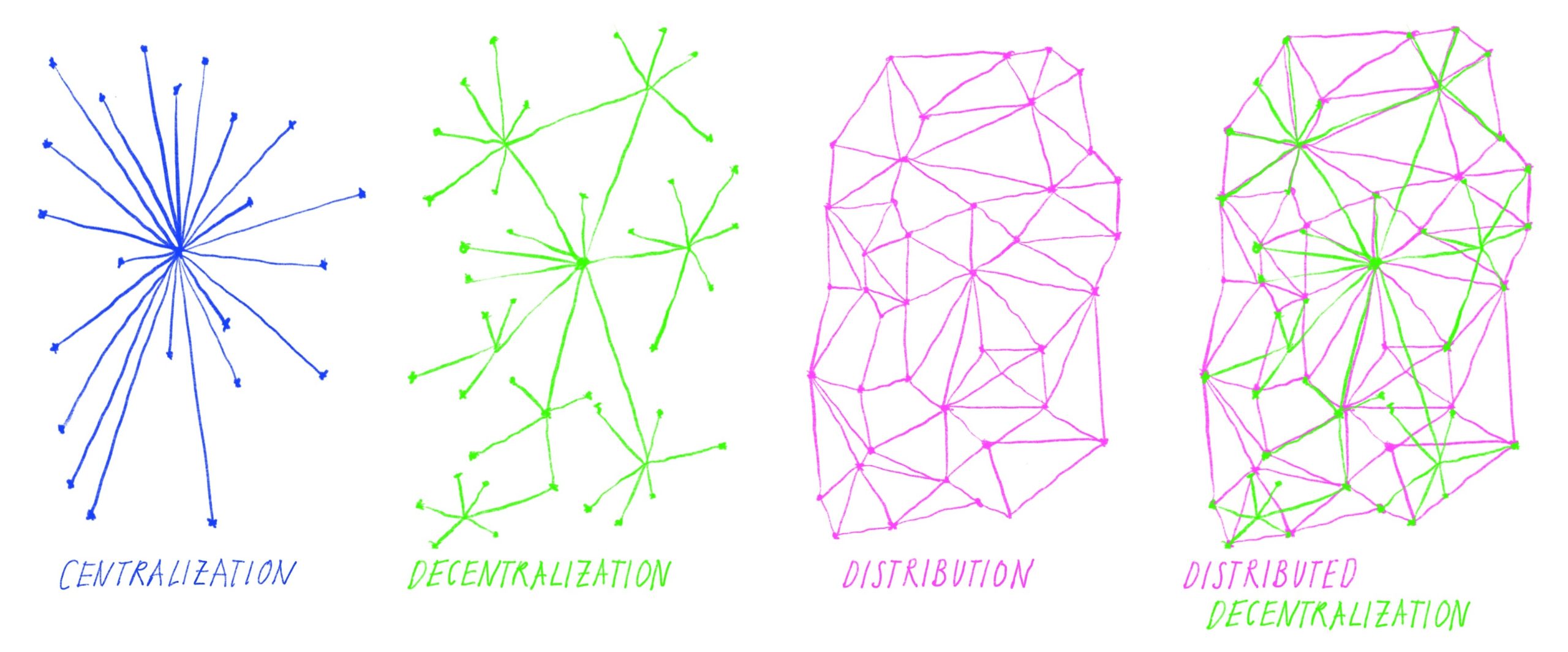
IPFS operates as a distributed network. When you request a file, your node searches for other peers who have that CID. Once found, your node downloads the data directly from those peers. There is no “master server.” The more popular a file becomes, the more copies exist on the network, making it faster and more resilient.
Step-by-Step Guide: Hosting Your First Data on IPFS
Getting started with IPFS is straightforward. Follow these steps to host your own immutable data.
Install the IPFS Desktop or Kubo CLI: Download the official implementation (Kubo) from the IPFS documentation site. For most users, the Desktop app provides a user-friendly interface to manage your node.
Initialize Your Node: Run the init command to create your local repository. This generates your peer identity and security keys.
Add Data to IPFS: Use the “Add” command. When you add a file, IPFS computes its CID. At this point, the file is locally available on your node.
Pin the Data: By default, IPFS nodes perform “garbage collection” to free up space. To ensure your file remains available, you must “pin” it. Pinning tells your node to keep this data permanently in local storage.
Connect to the Network: Once pinned, your node announces to the network that it holds this CID. Others can now retrieve the file from you using the CID or via an IPFS public gateway.
Examples and Real-World Applications
IPFS is not just a theoretical concept; it is the backbone of the modern decentralized web.
Decentralized NFT Metadata
Most NFTs are not stored on the blockchain because it is too expensive. Instead, they store a link to metadata. If that link points to a private server, the NFT becomes a “broken link” when the server goes down. Developers use IPFS to store NFT images and JSON metadata, ensuring that the asset remains visible as long as the network exists.
Archiving and Research
Organizations like the Internet Archive utilize IPFS to protect humanity’s collective knowledge. By distributing copies of historical documents across thousands of nodes, they ensure that government censorship or corporate bankruptcy cannot erase information.
Resilient Content Delivery
Web developers use IPFS to host static assets (CSS, JS, images). Because these assets are content-addressed, they can be cached globally by any peer. This reduces latency, as users can fetch assets from a neighbor rather than a data center thousands of miles away.
Common Mistakes
Many newcomers fall into traps that compromise the availability of their data.
Assuming IPFS is “Forever” without Pinning: IPFS is a protocol, not a storage service. If you add a file to your node and then shut down your computer without pinning it to a remote service, the file will eventually be deleted from your node and become unavailable to the network.
Ignoring Gateways: Relying solely on public gateways (like ipfs.io) can be risky, as they can be rate-limited or blocked. Always maintain your own node or use a dedicated pinning service (like Pinata or Infura) for production environments.
Privacy Oversights: Once data is added to the IPFS network, it is public if the CID is known. Never add sensitive, unencrypted private data to IPFS. If you must store private files, encrypt them locally before uploading the CID.
Advanced Tips
To move beyond basic file hosting, consider these professional-grade strategies.
IPNS (InterPlanetary Naming System)
Since CIDs change every time you update a file, how do you point to “the latest version” of a website? IPNS allows you to create a mutable pointer to a CID. You can update the content of your site while keeping the same IPNS address, effectively creating a decentralized domain name.
Integrating with Filecoin
While IPFS is great for retrieving data, it doesn’t provide built-in economic incentives for others to host your files. Filecoin is a storage network built on top of the same content-addressing principles. You can use IPFS to serve your files and Filecoin to pay providers to store them long-term, creating a robust, incentivized storage layer.
The strength of IPFS lies in its ability to decouple data from the hardware that serves it. By focusing on the content rather than the location, we transition from a fragile web of servers to a resilient, permanent library of human knowledge.
Conclusion
The InterPlanetary File System represents a fundamental shift in how we handle information. By moving toward content-based addressing, we eliminate the fragility of centralized servers and create a more reliable digital landscape. Whether you are a developer looking to secure NFT metadata, an archivist preserving history, or a professional seeking to reduce dependency on cloud providers, IPFS provides the tools to build a permanent, immutable web.
Start small by pinning a few files, experiment with IPNS for dynamic content, and explore the synergy between IPFS and decentralized storage networks. The future of data is not where it lives, but what it is.



Leave a Reply