
The Architecture of Clarity: Using Hierarchical Information Architecture to Surface Critical Insights
Introduction
In the digital age, we are suffering from a paradox of choice. Information is abundant, but actionable insight is scarce. Whether you are managing a complex dashboard, designing a corporate intranet, or restructuring your company’s internal documentation, the primary obstacle to productivity is not a lack of data—it is the lack of context. Without a clear structure, every piece of information demands equal attention, leading to cognitive overload and “analysis paralysis.”
Hierarchical information architecture (IA) serves as the structural scaffolding for how information is organized, categorized, and presented. By establishing a clear hierarchy, you do more than just tidy up your data; you create a prioritize-first environment where the most critical insights naturally rise to the surface. This article explores how to move beyond data dumps and build intelligent systems that help you—and your audience—make better decisions faster.
Key Concepts
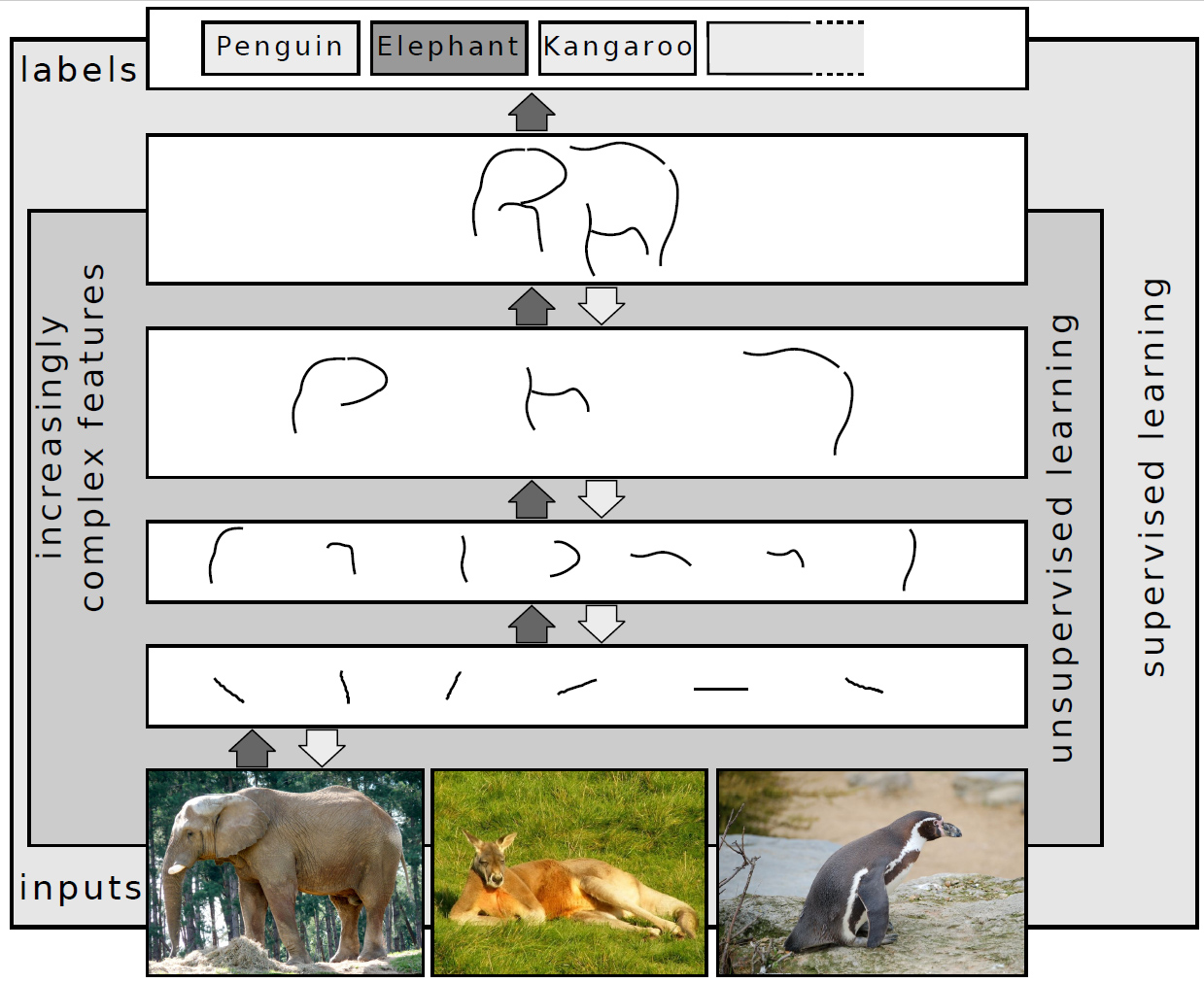
At its core, hierarchical information architecture is the practice of arranging information in a parent-child relationship. Think of it like a library filing system: you move from the broad (the genre) to the specific (the author) to the granular (the specific book). In a business context, this means structuring data so that high-level summaries are immediately accessible, while granular supporting details are tucked away until needed.
The fundamental goal is to respect the cognitive load of the user. Human beings are excellent at pattern recognition but struggle when forced to process too many variables at once. A hierarchical structure employs a principle known as “progressive disclosure.” This ensures that users see the most important data points first, providing the ability to drill down into the “why” and “how” only if they choose to do so. By layering your information, you prevent critical insights from being buried under layers of noise.
Step-by-Step Guide
- Audit Your Existing Data: Before building a hierarchy, you must understand your current landscape. Catalog the information you have and tag each piece of data as either “Strategic” (high-level, decision-driving), “Tactical” (process-oriented), or “Operational” (granular data/logs).
- Define Your User’s Primary Objective: Why is someone looking at this data? If the goal is to make a quick financial decision, your hierarchy must place budget summaries at the top level. If the goal is technical troubleshooting, the hierarchy should prioritize error logs and diagnostic metrics.
- Create a “Top-Down” Taxonomy: Organize your categories from broadest to most specific. Ensure that each level in the hierarchy clearly informs the next. Use labels that reflect how your users think, not how your backend database is structured.
- Apply the 80/20 Rule (Pareto Principle): Identify the 20% of your data that drives 80% of your outcomes. These metrics should occupy the most prominent “real estate” in your design—the top of your dashboard, the landing page, or the first section of your report.
- Implement Progressive Disclosure: Design your interface or document so that the top layer is actionable. Use links, expandable tabs, or “drill-down” features to hide the supporting documentation. This keeps the primary view clean and focused on insights.
- Test for Friction: Observe a user as they interact with your structure. If they have to click more than three times to reach a critical insight, your hierarchy is too deep or poorly labeled. Refine based on their behavior, not your assumptions.
Examples or Case Studies
Consider the design of a Financial KPI Dashboard. A poorly structured dashboard displays every ledger entry, recent transaction, and quarterly trend on a single screen. The user, overwhelmed by the sheer volume of numbers, struggles to answer the most important question: “Are we on track to meet our growth goals?”
By applying hierarchical IA, the dashboard is transformed. The top-level view features three core indicators: Revenue, Burn Rate, and Runway. These are the critical insights. If the user clicks on “Revenue,” they are taken to a secondary hierarchy showing revenue by channel. If they click on a specific channel, they see individual transactions. The hierarchy allows the executive to stay at the 30,000-foot view while providing a clear path to the granular details.
Similarly, consider Project Management Documentation. Instead of one massive document titled “Project Guidelines,” a hierarchical approach breaks this into a landing page titled “Project Hub.” The hub features a “Must-Read” section (goals, timeline, key stakeholders), followed by a “Supporting Resources” section (meeting minutes, technical specs, and archives). This hierarchy forces the reader to consume the critical “Why” and “What” before getting lost in the “How.”
Common Mistakes
- The “Everything is Important” Trap: When stakeholders insist that all metrics are critical, the hierarchy collapses. If everything is prioritized, nothing is prioritized. You must be willing to push back and relegate secondary data to deeper levels.
- Shallow Hierarchy (The Flat-File Disaster): A completely flat information architecture is just as bad as a disorganized one. When you put 50 items at the same hierarchical level, you create a menu or list that is impossible to scan.
- Ignoring User Mental Models: Organizing data by how your department is structured (e.g., “Engineering Folder,” “Sales Folder”) is rarely how your users think. Organize by functional goal, not by departmental hierarchy.
- Failure to Update: Information architecture is a living organism. If you don’t prune and re-evaluate your hierarchy as business needs change, your system will eventually become a “digital landfill” where relevant insights go to die.
Advanced Tips
To truly master hierarchical IA, consider the power of Visual Hierarchy. Even within a perfect information structure, you can use typography (bolding, font size), color, and white space to signal importance. A critical insight should not only be in the right place—it should look different from the supporting data surrounding it. Use “Call-to-Action” boxes or highlighted key findings to draw the eye specifically where you want it to go.
Additionally, embrace Metadata and Searchability. Hierarchical structure is the map, but search is the vehicle. Ensure that even the most deeply buried pieces of information are tagged with descriptive metadata. This allows users who know what they are looking for to bypass the hierarchy entirely, while those who are exploring rely on your structure to guide them.
Finally, utilize the “Three-Click Rule” as a benchmark, not a law. Your goal is to minimize the distance between the user’s need and the resolution of that need. If your hierarchy is deep because the topic is complex, use “summary cards” at the top of every level to recap what the user can expect to find deeper inside. This provides context without requiring the user to navigate the entire path.
Conclusion
Hierarchical information architecture is the invisible bridge between raw data and informed action. By carefully curating the structure of your information, you reduce cognitive friction, improve user satisfaction, and ensure that the most important insights are always front and center. It is an investment in clarity that pays dividends in every meeting, dashboard, and document you produce.
Remember that your structure is never “finished.” As your business evolves, your information needs will shift. Regularly audit your hierarchy, challenge your categories, and prioritize the user’s need for insight above the internal convenience of storing data. When you treat information as a valuable resource to be architected rather than a pile to be managed, you gain a significant competitive advantage: the ability to see clearly in an increasingly cluttered world.
Further Reading



Leave a Reply