Introduction: The critical role of TLS in modern data privacy.
Key Concepts: Understanding Handshakes, Certificates, and Cipher Suites.
Step-by-Step Guide: Implementing TLS 1.3 on a server.
Real-World Applications: Securing APIs and internal microservices.
Common Mistakes: Misconfigurations, expired certs, and weak protocols.
Advanced Tips: Perfect Forward Secrecy (PFS) and HSTS.
Conclusion: Maintaining a security-first mindset.
Securing Data in Transit: A Technical Guide to Implementing TLS
Introduction
In an era where data breaches make headlines daily, the concept of “privacy by default” is no longer optional—it is a baseline requirement. Whether you are managing a simple web application or a complex distributed system, the data moving between your clients and servers is a prime target for interceptors. Transport Layer Security (TLS) acts as the fundamental guardrail for this traffic, ensuring that data is encrypted, authenticated, and untampered with during transit.
If your systems still rely on unencrypted HTTP, you are essentially broadcasting sensitive user information—such as login credentials and financial details—across a public medium. This article provides a deep dive into the practical application of TLS, moving beyond basic concepts to help you build a robust, production-grade security posture.
Key Concepts
To implement TLS effectively, you must understand the mechanics beneath the hood. TLS is not merely an “on” switch; it is a complex cryptographic dance.
The TLS Handshake
Before any application data is sent, the client and server perform a “handshake.” During this phase, they negotiate the version of TLS to use, agree on a cipher suite (the set of algorithms for encryption and key exchange), and verify the server’s identity using a digital certificate. In TLS 1.3, this process has been streamlined to a single round-trip, significantly reducing latency compared to its predecessors.
Certificates and CAs
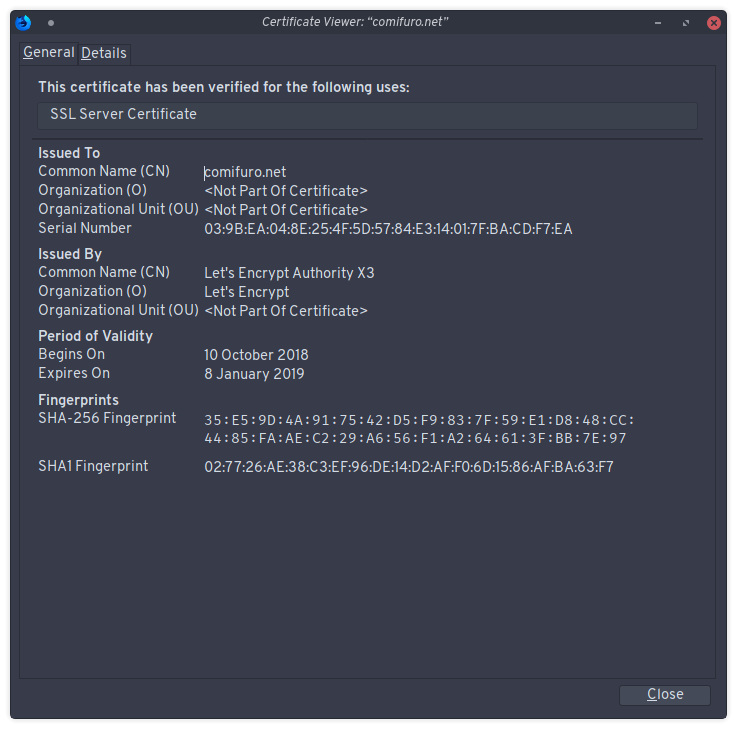
A TLS certificate is your server’s “digital ID.” It binds a public key to an identity (your domain name). These certificates are issued by Certificate Authorities (CAs). When a browser connects to your server, it checks if the certificate is signed by a trusted CA, ensuring that users are actually communicating with you and not an attacker performing a Man-in-the-Middle (MitM) attack.
Cipher Suites
The cipher suite defines the “math” behind the encryption. It dictates how keys are exchanged, how the message is authenticated (MAC), and which block cipher is used for encryption. Modern standards mandate the use of AEAD (Authenticated Encryption with Associated Data) ciphers, such as AES-GCM or ChaCha20-Poly1305.
Step-by-Step Guide: Implementing TLS 1.3
While tools like Nginx and Apache handle much of the heavy lifting, configuring them for modern security standards is essential. Below is the process for implementing a hardened TLS configuration on a standard Nginx server.
Obtain a Valid Certificate: Use an automated service like Let’s Encrypt via Certbot. Run the command certbot –nginx to automatically generate and configure your SSL certificates.
Update Your Configuration: Open your Nginx site configuration file (typically in /etc/nginx/sites-available/).
Disable Insecure Protocols: Explicitly disable SSLv3, TLS 1.0, and TLS 1.1. These protocols have known vulnerabilities. Set ssl_protocols TLSv1.2 TLSv1.3;.
Select Strong Ciphers: Ensure your server prefers high-security cipher suites. Use: ssl_ciphers ECDHE-ECDSA-AES128-GCM-SHA256:ECDHE-RSA-AES128-GCM-SHA256…;
Enable Perfect Forward Secrecy (PFS): PFS ensures that if a server’s private key is compromised in the future, past communications cannot be decrypted. By using ECDHE (Elliptic Curve Diffie-Hellman Ephemeral) key exchange, you guarantee this protection. Set ssl_prefer_server_ciphers on;.
Restart and Validate: Run nginx -t to test the configuration syntax, then restart the service. Use an external tool like the Qualys SSL Labs server test to verify your grade.
Real-World Applications
TLS is not just for websites. It is the backbone of modern software architecture.
TLS is the primary defense mechanism against packet sniffing on shared networks, such as coffee shop Wi-Fi or compromised ISP infrastructure.
Securing Microservices: In a containerized environment (like Kubernetes), service-to-service communication should occur over mTLS (Mutual TLS). This ensures not only that the connection is encrypted, but that both the client and server verify each other’s identity via certificates.
Protecting API Integrations: When your server communicates with third-party APIs (e.g., Stripe, AWS, or Twilio), TLS ensures that the API keys and payloads sent in the headers remain private.
Internal Databases: If your application server connects to a remote database, ensure that the connection string mandates SSL. Many databases, like PostgreSQL, require explicit configuration to reject non-SSL connections.
Common Mistakes
Security is often compromised by oversights rather than sophisticated attacks. Avoid these common pitfalls:
Self-Signed Certificates in Production: While useful for testing, self-signed certificates do not provide trust. They force users to click through security warnings, which conditions them to ignore genuine warnings. Always use a recognized CA.
Ignoring Certificate Expiration: Letting a certificate expire results in downtime and user distrust. Use automation tools (Certbot/acme.sh) to handle renewals automatically.
Mixed Content Issues: Serving an HTTPS page that loads insecure (HTTP) assets, such as scripts or images, can cause browser errors and degrade your site’s security score. Use Content Security Policy (CSP) headers to enforce upgrades to HTTPS.
Weak Key Lengths: Using RSA keys shorter than 2048 bits makes your encryption vulnerable to brute-force attacks. Stick to 2048-bit or 4096-bit RSA keys, or better yet, move to ECC (Elliptic Curve Cryptography) for better performance and security.
Advanced Tips
To take your security to the next level, consider these advanced implementation strategies:
HTTP Strict Transport Security (HSTS): HSTS is a security header that instructs the browser to never attempt to connect to your site via HTTP. Once a browser sees the HSTS header, it will only ever attempt HTTPS connections, effectively preventing “downgrade attacks.” Set the Strict-Transport-Security header with a long max-age value.
Certificate Transparency (CT): Monitor your domain using tools like crt.sh to see all certificates issued for your domain. This helps detect unauthorized certificates issued by rogue CAs in your name.
OCSP Stapling: This process improves the performance of the TLS handshake. Instead of the client contacting the CA to check if your certificate is revoked, the server “staples” a time-stamped proof of validity to the handshake itself, reducing the number of requests the client needs to make.
Conclusion
Encrypting data in transit using TLS is a mandatory practice for any digital entity. By shifting from the outdated idea of “basic SSL” to a rigorous implementation of TLS 1.3, you move your infrastructure from being “just secure enough” to being truly resilient against interceptors and attackers.
Remember that security is an ongoing process. Regularly test your configurations, automate your certificate lifecycle, and keep your software dependencies patched. By prioritizing the privacy and integrity of your data, you demonstrate a commitment to user trust that remains the most valuable asset in the digital economy.



Leave a Reply