

The Fortress Principle: Using Sandboxing to Secure Machine Learning Model Execution
Introduction
As machine learning models grow in complexity and integration, they have transitioned from isolated experiments to critical components of enterprise infrastructure. However, this shift introduces significant risk. When you deploy a model—especially one that executes code or processes untrusted external input—you are effectively opening a door into your system architecture. If that model is compromised, or if it triggers an unexpected, malicious routine, your entire host environment is at stake.
Sandboxing is the cybersecurity gold standard for mitigating these risks. By creating a strictly controlled, isolated execution environment, you can run model inference and code-generation tasks with the confidence that any failure or exploit will be contained within a digital “bunker.” This article explores the architecture of sandboxing for AI models and provides a blueprint for implementing it securely in production environments.
Key Concepts
At its core, a sandbox is a software-defined boundary. It restricts a process’s access to the underlying operating system, network, files, and memory. In the context of AI, sandboxing serves two primary purposes:
- Environment Isolation: Prevents models from accessing sensitive system libraries, environment variables (like API keys), or hardware interfaces that they do not strictly need.
- Resource Governance: Limits the amount of CPU, GPU, and RAM a model can consume, effectively stopping denial-of-service attacks or runaway recursive loops.
When running Large Language Models (LLMs) that utilize tool-use or “code interpreter” features, the model generates executable code. Without a sandbox, this code runs with the privileges of the application process. With a sandbox, the code runs in a ephemeral, restricted container where it can neither see nor touch the host infrastructure.
Step-by-Step Guide: Implementing Model Sandboxing
Building a secure execution environment requires a layered approach. Follow these steps to move from an open architecture to a hardened one.
- Define the Least Privilege Profile: Identify exactly what the model needs to function. Does it need internet access? Does it need write access to a file system? In most cases, the answer is a hard “no.” Define these constraints before writing any code.
- Choose Your Isolation Technology: For production, standard Docker containers are often insufficient. Look toward lightweight virtualization technologies like gVisor or Firecracker. These provide a stronger security boundary between the guest process and the host kernel.
- Implement Ephemeral File Systems: Use read-only mounts for your base model environment. Any temporary files generated by the model should exist only in a memory-backed, transient storage space that is wiped clean the moment the inference task is completed.
- Network Egress Filtering: If your model does not need to call external APIs, block all outbound network traffic via your container runtime or host firewall (e.g., iptables or eBPF). If it does need to call specific APIs, use a proxy to whitelist only those specific domains.
- Resource Quotas and Timeouts: Implement strict timeouts for execution. If a process doesn’t finish in 30 seconds, terminate it. Couple this with hard limits on memory consumption to prevent memory-exhaustion exploits.
Examples and Real-World Applications
Case Study: Financial Data Analysis
A fintech firm uses an LLM to generate Python code for ad-hoc data analysis on raw CSV files. By sandboxing the Python execution environment using a dedicated, sidecar container, the firm ensures that even if the LLM generates malicious code intended to “exfiltrate” data, the code has no path to the public internet. The sandbox acts as an air-gapped laboratory for the code to run, returning only the final numerical output to the main application.
Application: CI/CD Pipelines for ML
When evaluating new models or fine-tuning checkpoints, teams often run untrusted weights or third-party code. By using gVisor to sandbox these evaluation runs, companies protect their build servers from “model-based malware”—malicious payloads embedded in model weights that attempt to execute code upon loading via pickle files or other serialized formats.
“The goal of a sandbox is not to make the model trustworthy; it is to make the model’s environment so restrictive that trustworthiness is no longer a requirement for safety.”
Common Mistakes
- Confusing Docker with Security: Docker containers share the host kernel. If a process escapes the container, it can potentially compromise the host. For high-stakes AI workloads, always pair Docker with a secure runner like gVisor or Kata Containers.
- Over-Privileging the Container: Granting root access to the user inside the sandbox is a frequent oversight. Always map the internal user to a non-privileged UID on the host system.
- Ignoring Side Channels: Even if you isolate the process, remember that timing attacks or resource-contention attacks can sometimes leak data. Ensure that you are not running sensitive user data and non-sensitive data in the same, non-isolated hardware thread.
- Neglecting Logs and Observability: If your sandbox triggers a security violation and silently kills the process, you will struggle to debug legitimate failures. Always log standard error outputs from the sandbox to a centralized monitoring system.
Advanced Tips
To take your sandboxing to the next level, consider implementing eBPF-based security monitoring. Tools like Tetragon allow you to write security policies that monitor system calls in real-time. If a sandboxed model process suddenly tries to invoke a sensitive system call (like `execve` or `ptrace`), the eBPF program can block the call instantly and trigger an alert to your security operations center.
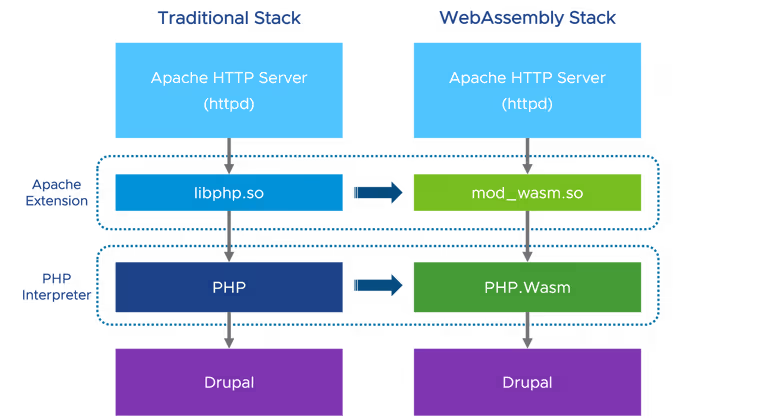
Furthermore, explore WebAssembly (Wasm) for sandboxing. Wasm provides a highly portable, secure, and lightning-fast sandbox that is inherently isolated. Because Wasm runs in a strictly defined capability-based environment, it is increasingly becoming the preferred method for executing untrusted AI-generated code snippets in cloud-native applications.
Conclusion
Sandboxing is no longer an optional “extra” for AI developers; it is a fundamental requirement for deploying models into production environments. By isolating model execution, you protect your infrastructure from the unpredictable nature of AI-generated code and potential malicious actors exploiting model vulnerabilities.
Start by auditing your current model execution flow. Where are the gaps? What permissions are currently “open by default”? By implementing the principle of least privilege, leveraging lightweight virtualization, and enforcing strict resource limits, you create a robust, resilient architecture that allows your AI to innovate without endangering your core operations. Security in the age of AI isn’t about stopping the progress of models—it’s about providing them with a safe place to work.





Leave a Reply